

Private Client Security
The Most Dangerous Network You'll Use This Month Is the One in Your Hotel Room
September 18, 2026
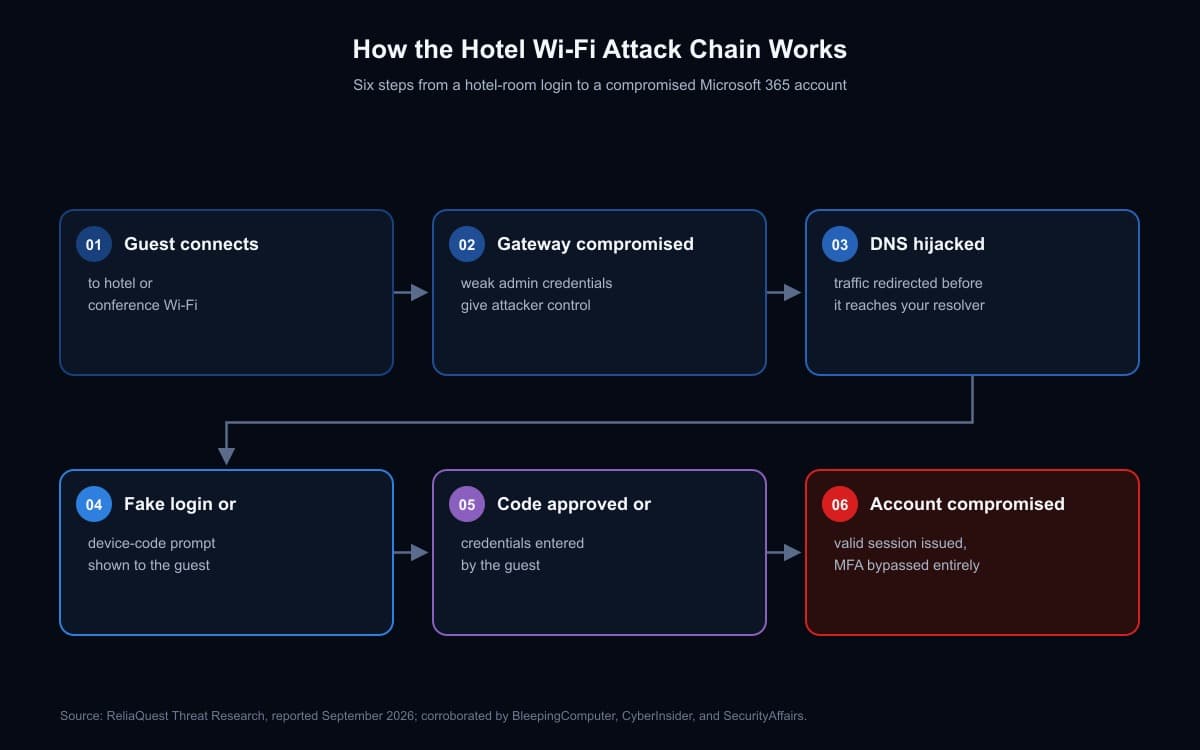
I've spent enough of my career on both sides of network infrastructure to have a reflexive distrust of any network I don't control, and hotel Wi-Fi has always earned that distrust more than most. A report from ReliaQuest's threat research team, published this month, confirms why. Since at least June 2026, attackers have been compromising the Wi-Fi gateway devices at hotels and conference centers - the actual hardware that controls the network you connect to when you type in a room number and last name - and using that control to redirect guests into fake Microsoft 365 login pages. Compromised gateways have turned up across multiple U.S. cities, plus India and Saudi Arabia, and the victims span finance, law, healthcare, energy, retail, and professional services. If you travel for business and check email from a hotel room, this is written for you.
Why the gateway is the real target
Here's the part of this story I don't think gets emphasized enough, and it's the part my infrastructure background makes hard to ignore: the attackers didn't go after individual guests. They went after the gateway itself - the shared device sitting between every guest at that property and the internet. Compromise one underpowered, rarely patched, frequently default-credentialed piece of hardware, and you get standing access to every guest who connects afterward, for as long as it takes someone to notice. That's an extraordinarily efficient trade for an attacker, and it's exactly the kind of target I'd expect to be under-defended: hospitality IT budgets are not built around the assumption that the Wi-Fi gateway is a high-value target, and in my experience, they're right about that far less often than they think.
Once an attacker has administrative control of the gateway, they change its DNS settings. That means the interception happens upstream of whatever DNS resolver you've configured on your own device - switching to a public resolver like 8.8.8.8 doesn't help you here, because the gateway itself is deciding where your traffic goes before your resolver preference is ever consulted. Guests trying to reach Microsoft's real login domain get quietly redirected to one of several lookalike domains the attackers registered - m365-owa[.]com and owa-ms365[.]com among them - built to be visually indistinguishable from the real thing.
The twist that should concern you more than the phishing page
A straightforward fake login page is bad, but it's a known threat, and reasonably good practices catch it: check the URL, use a password manager that won't autofill on the wrong domain, don't reuse credentials. What ReliaQuest also documented in a subset of these cases is meaningfully harder to defend against, because it doesn't rely on you being fooled by a fake page at all.
In those cases, the attacker abuses Microsoft's device-code authentication flow - a legitimate feature built for signing into devices with no keyboard, like a smart TV or a conference-room console. The victim is prompted to visit Microsoft's real login page and enter a short code. Because it's the real page, everything about it looks correct. What the victim doesn't know is that the code they're entering approves a login session the attacker started, not one of their own. Enter it, and Microsoft hands the attacker a valid access token for the account, without the attacker ever needing a password, and without any of it looking like the credential theft your training has taught you to watch for.
This is the detail I want private clients and their staff to actually sit with: this variant doesn't just beat weak passwords or SMS codes. It beats phishing-resistant authentication too, including passkeys and hardware security keys, because it was never trying to phish your login in the first place. You're not being tricked into typing a password into a fake site. You're being tricked into authorizing someone else's session on the real one. No authentication method that only protects the login step stops that, which is exactly why I'd treat this as a policy problem, not a strength-of-authentication problem, more on that below.
What the attribution actually tells you
ReliaQuest noted that the tradecraft here echoes "FrostArmada," an operation their own reporting and others' have tied to APT28, the Russian state-linked group. It's a genuinely useful observation, and I'd read every word of how they phrased it, because they didn't stop at the interesting part. They were explicit that the connection is based on shared technique, not shared infrastructure, and that this specific technique wasn't documented in prior FrostArmada reporting. That's the discipline I'd want from any attribution claim, in a boardroom or a courtroom: a shared method tells you two things might be related. It doesn't tell you they're the same actor, and treating an interesting pattern as a proven conclusion is exactly the kind of shortcut that gets attribution wrong. Whether this specific campaign traces back to a state-linked group or an unrelated criminal group that's simply good at copying effective tradecraft doesn't change what you need to do about it. Either way, your account was just as exposed.
What I'd actually do about this
Treat hotel and conference Wi-Fi as hostile by default, not as a convenience with occasional risk. That means a VPN that tunnels all your traffic, including DNS, engaged before you do anything that touches a real account, not opened after you notice something looks off. It means training yourself and anyone traveling on your behalf to be suspicious of any prompt asking you to enter a code to "verify" or "reauthorize" a device, regardless of how legitimate the page underneath it looks, and to stop and independently confirm the request before completing it. And it means going to whoever manages your Microsoft 365 tenant - your IT provider, your family office's technology vendor, or your own team - and asking a specific, pointed question: is the device-code authorization flow restricted through Conditional Access to only the specific devices and scenarios that actually need it? For most organizations, and certainly for most private clients and family offices, the honest answer is that nobody has ever asked that question, which means the answer is almost certainly no.
None of this requires becoming your own IT department. It requires the same discipline I've been advocating for this client group all along: assume the network, the device, and the prompt in front of you could all be compromised at once, verify out of band before you act, and make sure the people managing your accounts have closed the specific doors attackers are actually using right now, not just the ones that made headlines two years ago.